 Noctave
Two ways to write the same music
Falling notes (also called a piano roll) draw each note as a bar of light: its place gives the key, its length gives the duration. You understand it without learning anything, and you play at once.
Sheet music says the same thing in less space, and much more: the meter and its beats, the key, the fingering, the dynamics, the phrases, the repeats. It fits on a page you take in at a glance, and it's in this form that music is shared, at a music school, with a teacher or on a friend's music rest.
What falling notes don't teach you
With falling notes alone, the eyes follow the light and the hands respond: you can play a whole piece without being able to play it from its score. Rhythm reads as distances, not beats; the key can't be seen; a repeat looks like a new passage. Nothing wrong with that to start, but sooner or later you need to read.
The Noctave way
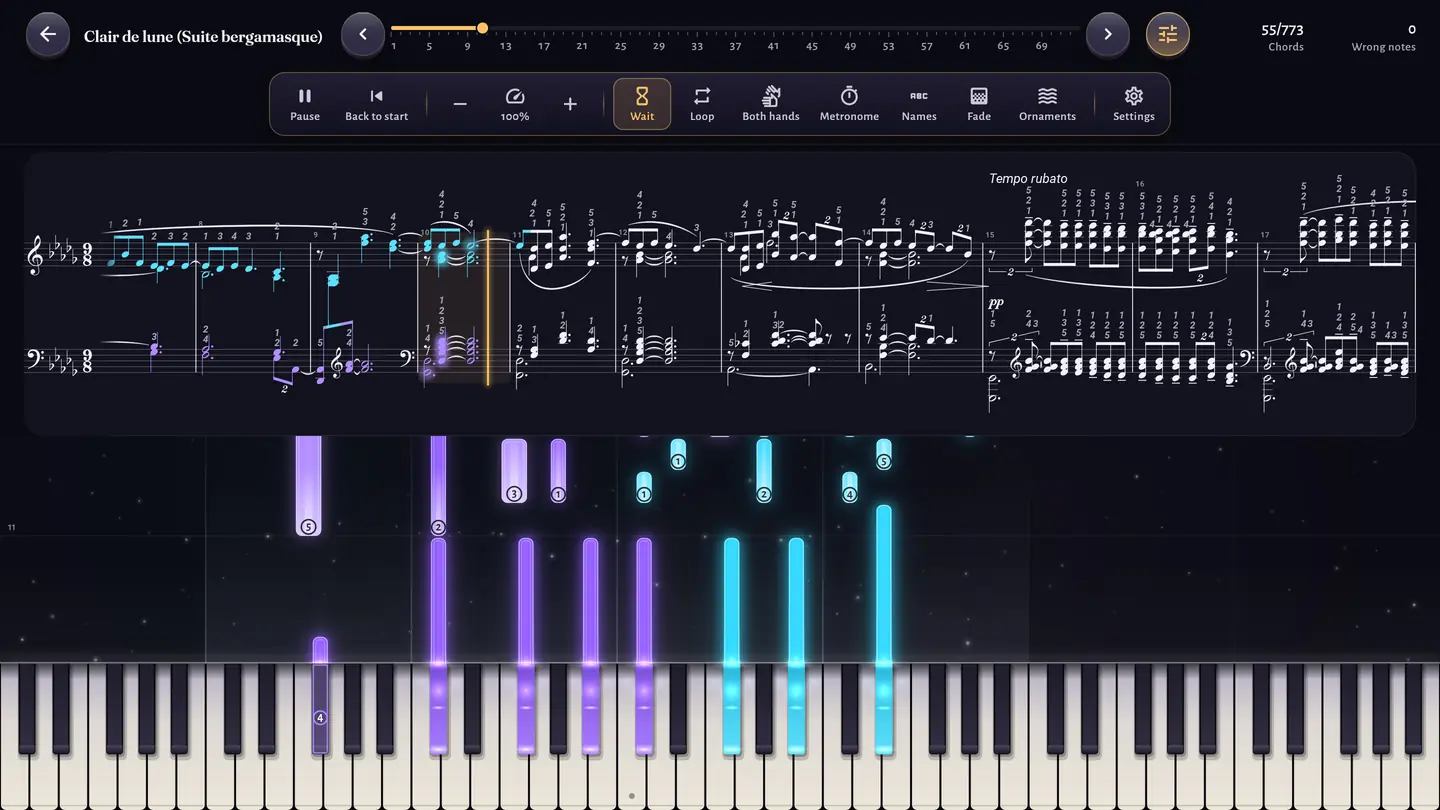
- The score is always there. On a tablet, in Game mode as in Learning mode, it scrolls above the falling notes: by default on one line, continuously, the cursor fixed at the left third so you can read ahead; the “Pages” mode stays available in the settings.
- Each note you play lights up on the score: in its hand's color when it's right, in pink when it's missed. You see on the page what your hands just did.
- The journey fades the falling notes. In Game mode, they stay opaque in chapters 1 and 2, then fade chapter after chapter: 90% at the start of chapter 3, 15% at the end of chapter 8, never below 10%. Their opacity shows at the top of the screen during the game. The Falling notes help setting (Settings › Display) keeps them always visible if you prefer.
- In Learning mode, fading is yours. The Fade slider sets the opacity from 0 to 100%. With Automatic fading, each right note fades the falling notes a little, and each missed note brings them back.
- Score only removes the falling notes: the score and the keyboard remain, and the keyboard lights up after you play. In wait mode, the expected notes pulse gently on the score.
A routine for a new piece
In Learning mode, on a tablet:
- Listen to the piece by choosing “None (listen)” for the hands: Noctave plays it, you follow the score with your eyes.
- One hand at a time, with wait mode and a tempo of 50 to 70%: the music waits until you find the right note. Look at the score while you search.
- Both hands, still slowly, with a loop over the measures that resist.
- Lower the fading toward 50%, then switch to automatic fading.
- Score only to finish: if you play the passage without the falling notes, you read it.
When the score isn't shown
On a phone, the screen is too small for the score; an imported MIDI file has none. In these cases, the falling notes stay opaque, in Game mode as in Learning mode. To see the score of a piece of your own, import it as MusicXML: Add your own pieces.
To learn to read again outside the pieces, note by note, read Learn to read sheet music as an adult.